
Sometimes when you have a website/webshop there is a set of tasks that you perform to keep the website up to date or with which you perform certain actions. You can run these tasks manually, but it is easier to have them performed automatically for you. Cronjobs are useful for this; these are periodic tasks that are performed by the server.
In this article we explain how to set it up via cpanel and via SSH.
How is a cron job structured?
A cronjob always consists of two parts:
-
A Time Marker
-
The task
Look for an example below:
12 6 ** * php /home/domain1q/public_html/cron.php
We will explain how to read it using the above cronjob
Time indication
For the time indication you can use the following table
|
m |
minutes (0-59) |
|
h |
hours (0-23) |
|
Stupid |
day of the month (1 -31) |
|
mon |
month of year (1-12) |
|
dow |
day of the week (mon,tue,wed,thu,fri,sat,sun) |
So if we look at the example again, we can read it as follows:
m = 12
h = 6
dom = *
mon*
dow = *
This means that every day, in a week, of every month, the cronjob will be called at 06:12.
Specify task
The task part also consists of two parts:
-
used program
-
location of file you want to run
In the example you see that we use PHP as a program and that we use it to run the file cron.php in the location /home/domain1q/public_html/. In short, every day, in a week, of each month, at 06:12 the program PHP is used to execute the file cron.php from the location /home/domain1q/public_html .
Note! To use only php in your cronjob it is important to put the following part at the top of your cronjob:
PATH=/usr/local/bin/:/usr/bin:/bin
Your cronjob will then be as follows:
PATH=/usr/local/bin/:/usr/bin:/bin
12 6 ** * php /home/domain1q/public_html/cron.php
If you don't then php doesn't work and you have to use one of the following options:
- /usr/local/bin/php (then you use the default PHP version of your server)
- /opt/cpanel/ea-php70/root/usr/bin/php (If you want to use PHP 7)
- /opt/cpanel/ea-php56/root/usr/bin/php (If you want to use PHP 5.6)
Additional Options
However, there are some additional parts that you can add to your cronjob which perform different actions. Below we deal with some common additional options:
E-mail output from the cronjob
You can send the output of a cronjob to an email address. To do this, use the following section MAILTO= [email protected]. If you apply this to the cronjob from the example, it will be as follows:
MAILTO= something
12 6 ** * php /home/domain1q/public_html/cron.php
Write output from cronjob to /dev/null
If you do not want to receive any output from the cronjob (possible errors and/or message that it has been executed), add the following section to your cronjob: >> /dev/null 2>> >1
When you apply this to the cronjob from the example, it becomes as follows:
12 6 * * php /home/domain1q/public_html/cron.php >> /dev/null 2>&&1
How do I set up a cron job?
There are two ways to do that with us:
-
Via cPanel
-
Via SSH
Both ways are discussed below
Configure Cronjob via cPanel
In cPanel you can configure cronjobs using the option Cron tasks under the category Advanced

You will then see the following page:
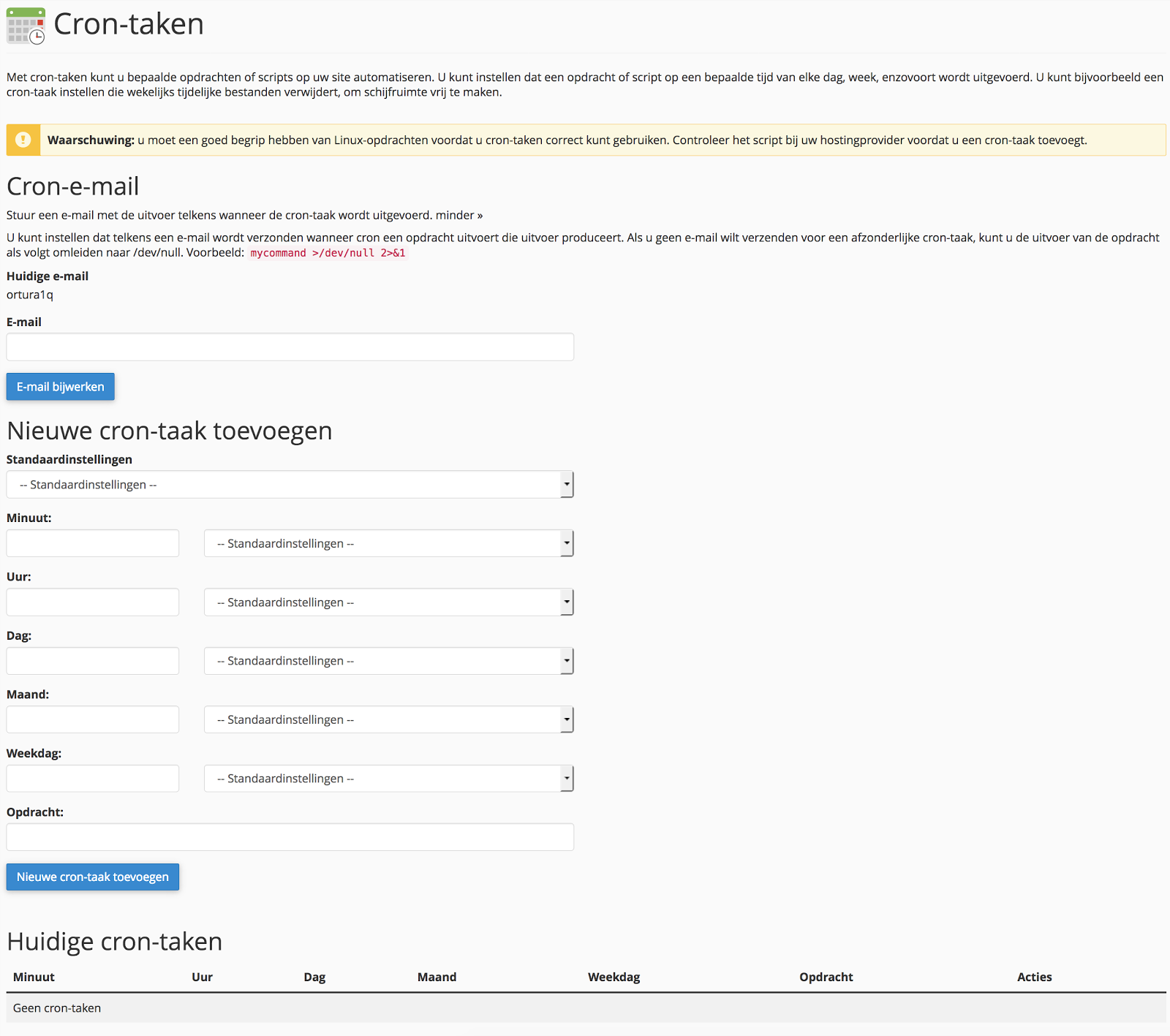
You can do the following things on this page
Email: Here you enter an e-mail address to which you want to send the output of your cronjob.
Add new cron task: Here you can specifically set the time tag yourself or choose a number of pre-programmed settings from Default settings. Under Command, specify the program and location of the file you want to run.
Current cron tasks: Here you can edit already set cronjobs with edit or delete with removal.
Configure Cronjob via SSH
If you are logged in to SSH, use the crontab -e command to set up your crontab.
Frequently asked questions
Can I use Wget or PHP better for my cronjob?
Both programs can be used with us for your cronjob. We recommend you to use the program, which advises the instance of your cronjob.
Why isn't my cronjob working?
Often this has to do with a part of your task not right. Please contact support and we will look with you.
Why are the tasks not carried out in my CRON?
Unfortunately, we can only see if the cronjob you have set is being called. We cannot see whether the tasks you have indicated in your CMS are being performed. You will then have to see what is going on in your CMS yourself.