
In cPanel we have an option called Spam Filters that is powered by Apache SpamAssassin, so that you are sure to receive much less spam. This is completely free and this article explains how to set it.
Configuring the spam filter
Step 1. Log on to your cPanel.
Step 2. Click Spam Filters in the Email category.
Step 3. Click Process New Emails and Mark them as Spam (if it is disabled).

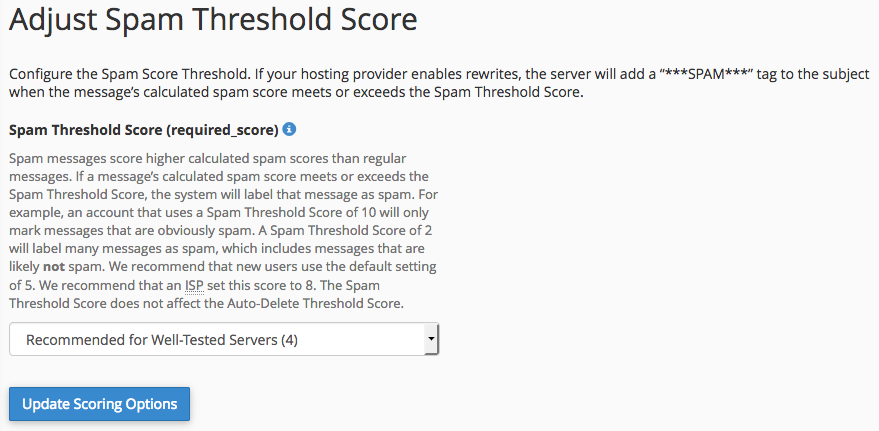
Step 4. Go to Spam Threshold Score and put it on Default (5) or Recommended for well tested servers (4) and click on Update Scoring Options.
Deleting existing spam messages
Step 1. Log on to your cPanel.
Step 2. Click Spam Filters in the Email category.
Step 3. Click Automatically Delete New Spam (AutoDelete) navigate to Configure Auto-Delete Settings.

Step 4. Make sure that the required_score on 5 or 4 is and click on Update Auto Delete Score.
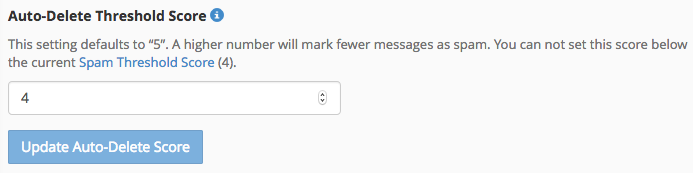
Step 5. All messages with that specific spam score will then be deleted.
Pay attention: If you still receive a lot of spam you can reduce the required_score to an adjusted number of 3.